
If you just got an issued SSL certificate and are having a hard time finding the corresponding private key, this article can help you to find that one and only key for your certificate.
What is a Private Key?
Firstly, let’s dive into basics a little. The design of global public key infrastructure, relying on which modern secure negotiation through SSL/TLS is possible, implies that there is always a pair of unique keys -
Public key vs private key
Public key is embedded in the SSL certificate and private key is stored on the server and kept secret. When a site visitor fills out a form with personal information and submits it to the server, the information gets encrypted with the public key to protect if from eavesdropping. On the server this information is decrypted by the private key and passed over for further processing. To ensure that nobody else can decrypt the transmitted message, we must use a unique and unforgeable pair of keys. So in a nutshell, one key without another is useless.
How do you generate a private key?
The private key is generated simultaneously with the CSR (certificate signing request), containing the domain name, public key and additional contact information. The CSR is to be sent to the certificate authority for validation and signing immediately after the certificate activation in the EWSHosting.net user account panel. The private key must be kept secret, ideally on the same server the certificate will be installed on.
Can I generate a new private key for my SSL certificate?
Since a public key with the additional information (i.e., domain name and administrative contact information) must be signed by a trusted certificate authority in order to make it applicable and legitimate for securing communication with your server, it wouldn’t make much sense if we could just make up a new private key for an already validated public key. On the other hand, we must be sure that nobody can create a matching private key basing on a public key. Thus, modern cryptosystems make such a task almost impossible.
What does a private key look like?
Private key is an encoded piece of data, usually a few dozen lines of randomly looking symbols, enclosed with the headers similar to these ones: -----BEGIN RSA PRIVATE KEY----- and -----END RSA PRIVATE KEY-----

Nonetheless, in most cases, this code won’t come into your sight while generating the CSR. It is usually created in the background and silently saved in the server’s filesystem. And obviously, during the SSL certificate installation the key should be fetched to the certificate automatically. However, some systems do not have such a kind of behaviour or sometimes we need to install the certificate on another server. These are the examples of the cases when we really need to know the exact location of the private key.
How to retrieve a misplaced private key
It depends on a certain server operating system and whether CLI (command line interface) or a web-hosting control panel of a particular type was used for CSR generation. And here comes the main part.
Below you can find tips, examples and pieces of advice that you can consider to follow in order to get a missing puzzle and avoid certificate reissue (i.e., repeating the process of activation and validation from scratch).
cPanel
There are 2 ways to get to the Private key in cPanel:
- Using SSL/TLS Manager
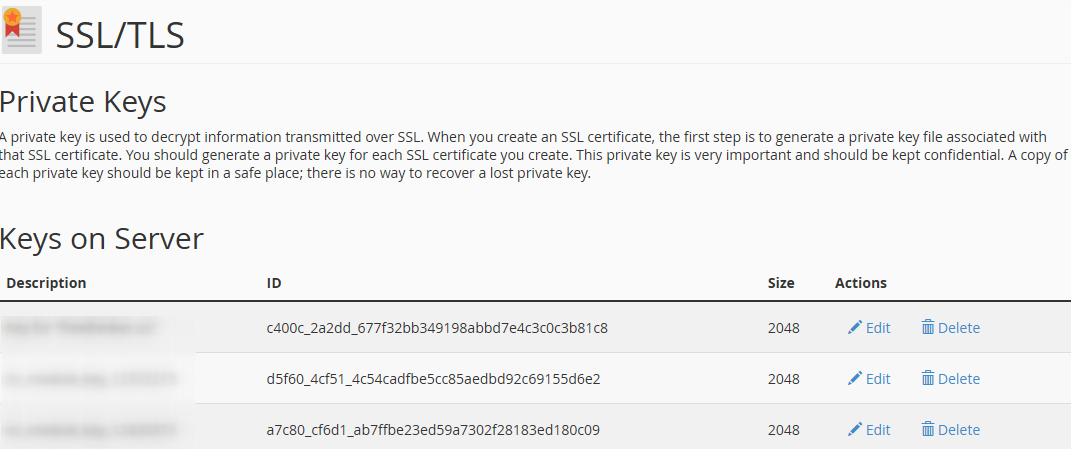
On the cPanel home page, click on “SSL/TLS Manager” and then on the “Private keys” button. On the new screen, you should see the list of the Private keys whenever created in a particular cPanel account. Clicking on the the “View & Edit” button will open the screen presenting the key in both encoded and decoded forms:
- Using File manager
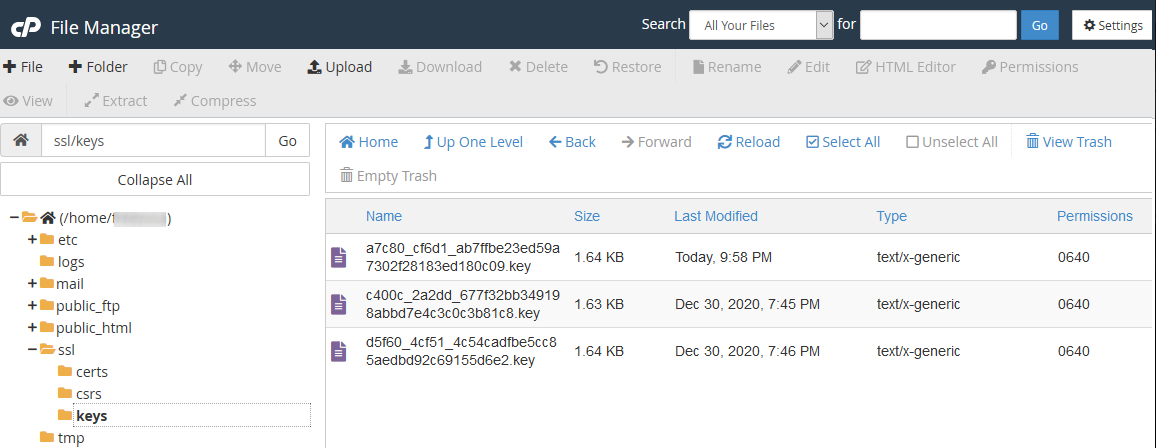
Click on the File manager button from the cPanel home screen and open the window like on the screenshot below. Next, you will need to find the “ssl” folder and then click on the “key” directory inside it. The private keys will appear in the right-side navigation panel. Then the required key file can be either downloaded or opened in plain text:
In conclusion, if none of the above-mentioned tips were helpful and the original private key cannot be retrieved, it is necessary to generate the new CSR / private key pair and reissue the certificate, making sure that the private key is safe this time.
